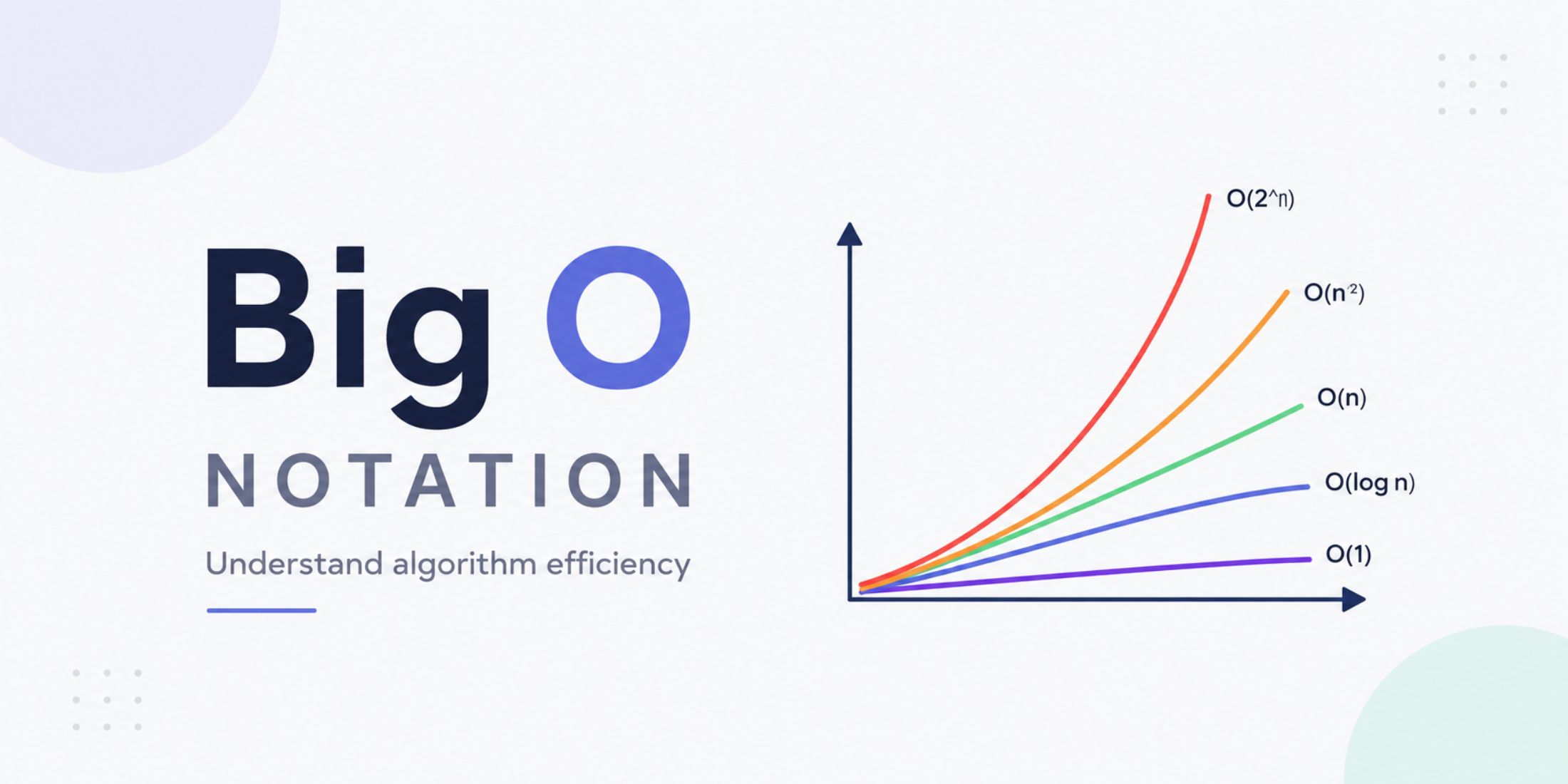
This is a concept used to describe the efficiency of an algorithm in terms of time and space. Big O notation allows us to analyze how an algorithm's performance changes as the input size increases.
It helps us understand the number of operations, time complexity, and space complexity. Below is a table with some of the most common cases:
| Notation | Description | Example |
|---|---|---|
| O(1) | Constant time | Accessing an element in an array |
| O(log n) | Logarithmic time | Binary search in a sorted array |
| O(n) | Linear time | Iterating through all elements in an array |
| O(n²) | Quadratic time | Bubble sort algorithm |
| O(2ⁿ) | Exponential time | Tower of Hanoi algorithm |
These notations are expressed in terms of "n", which represents the input size. For example, if we have an algorithm that iterates through all the elements in an array, its time complexity would be O(n), since the execution time grows linearly with the size of the array.
The most efficient algorithms are those with O(1) and O(log n) complexity, while the least efficient are those with O(n²) and O(2ⁿ) complexity. Therefore, when designing algorithms, it is important to consider efficiency and try to optimize performance whenever possible.
O(n) falls somewhere in the middle and is considered an acceptable level of complexity for many problems; that is why it is called "linear." This will help you better understand an algorithm's performance. When analyzing its execution time, you can consider it excellent, average, or poor, depending on the Big O notation assigned to it.
Constant time: O(1)
By constant, we mean that it will always execute in the same amount of time, regardless of the input size. For example, accessing a specific element in an array is a constant-time operation, because it does not matter how many elements the array contains: that element can always be accessed in the same amount of time.
The most common example is retrieving the first element of an array:
const array = [1, 2, 3, 4, 5];

const firstElement = array[0];
This is O(1) because it does not matter how many elements the array contains; the first element can always be accessed in the same amount of time.
I want to show you a comparison between two implementations that do the same thing. They may be a bit exaggerated, but they help us understand the difference between a naive implementation and an optimized one.
This is a fast implementation, but unnecessarily complex:
function getFirstUser(users) {
  let firstUser = null;

  for (let i = 0; i < users.length; i++) {
    firstUser = users[i];

    break;
  }

  return firstUser;
}
Now let's look at a simpler and more direct version that does the same thing with less code:
function getFirstUser(users) {
  return users[0];
}
Logarithmic time: O(log n)
Logarithmic time refers to algorithms that reduce the size of the problem at each step. In this case, the execution time grows logarithmically with the size of the input.
In other words, it consists of dividing the problem in half during each iteration.
If we have an array of 1000 elements, we do not need to examine all of them. The idea is to divide the array into smaller parts and discard half of the elements at each step.
A classic example is binary search:
const array = [1, 2, 3, 4, 5, 6, 7, 8];
const target = 5;

const search = (array, target) => {
  let left = 0;
  let right = array.length - 1;

  while (left <= right) {
    const mid = Math.floor((left + right) / 2);

    if (array[mid] === target) {
      return mid; // Item found
    } else if (array[mid] < target) {
      left = mid + 1; // Search in the right half
    } else {
      right = mid - 1; // Search in the left half
    }
  }

  return -1; // Item not found
};
This concept is much easier to understand by running the algorithm in debug mode in your code editor. You will see how half of the array is discarded during each iteration and how each variable changes value until the element is found or the search is completely exhausted.
It is called binary search because it divides the array into two parts during each iteration.
Linear time: O(n)
Linear time refers to algorithms that iterate through all elements of the input once. In this case, the execution time grows linearly with the size of the input.
This is one of the easiest cases to understand. If we are talking about an array of 1000 elements, the algorithm will iterate through all 1000 elements once, so the execution time will be proportional to the size of the array.
const array = [1, 2, 3, 4, 5];

const sum = (array) => {
  let total = 0;

  for (let i = 0; i < array.length; i++) {
    total += array[i];
  }

  return total;
};
As you can see, the execution time depends directly on the size of the array.
Another example is iterating through an array to find a specific element:
function findUser(users, name) {
  for (const user of users) {
    if (user === name) {
      return true;
    }
  }

  return false;
}
Notice that there is no magic way to find the element here. We must iterate through the records until we locate it. Finding a user with this technique is O(n), since the execution time grows linearly with the size of the array.
How can we improve it?
const users = {
  'Alice': { age: 25 },
  'Bob': { age: 30 },
  'Charlie': { age: 35 }
}

function findUser(name) {
  return users[name] !== undefined;
}
If we search for 'Alice', we will get true; if we search for 'Fabien', we will get false.
console.log(findUser('Alice')); // true
console.log(findUser('Fabien')); // false
Here we are using constant-time complexity, O(1), because it does not matter how many users we have: we can always access a specific user directly in the same amount of time. That is the difference: iterating through all records is O(n), while direct access is O(1).
Quadratic time: O(n²)
This is the typical case of algorithms that contain nested loops; for example, a for loop inside another for loop. In this case, the execution time grows quadratically with the size of the input.
const array = [1, 2, 3, 4, 5];

for (let i = 0; i < array.length; i++) {
  for (let j = 0; j < array.length; j++) {
    console.log(array[i] * array[j]);
  }
}
It is a simple example, but if the array contains 1000 elements, the outer loop will execute 1000 times, and the inner loop will also execute 1000 times for each iteration of the outer loop. Therefore, the execution time will be proportional to the square of the array size.
Mathematically, if the array contains 1000 elements, we are talking about a total of 1000000 operations.
In short, it means that the execution time is proportional to the square of the input size.
Exponential time: O(2ⁿ)
The word exponential refers to the fact that the execution time grows very quickly as the input size increases.
If we represent it on a graph, the growth curve is very steep, almost vertical.
A classic example of an exponential algorithm is the Tower of Hanoi problem, where the number of moves required to solve it doubles with each additional disk.
const n = 3;
const source = 'A';
const target = 'C';
const auxiliary = 'B';

const hanoi = (n, source, target, auxiliary) => {
    if (n === 1) {
        console.log(`Move disk 1 from ${source} to ${target}`);

        return;
    }

    hanoi(n - 1, source, auxiliary, target);

    console.log(`Move disk ${n} from ${source} to ${target}`);

    hanoi(n - 1, auxiliary, target, source);
};

hanoi(n, source, target, auxiliary);
Why is it exponential? Because to solve the problem, we constantly need to move disks to the auxiliary tower and then to the destination tower. As a result, the number of moves doubles with each additional disk.
The execution time doubles or grows exponentially as the input size increases. It is a solution that does not scale well and is considered extremely inefficient for large inputs.
We can also use the classic Fibonacci sequence example, which has exponential complexity:
const fibonacci = (n) => {
  if (n <= 1) {
    return n;
  }

  return fibonacci(n - 1) + fibonacci(n - 2);
};
Try console.log(fibonacci(5)); and you will see that the result is fast. However, if you use a larger number, such as 40, the execution time will be much longer, because the algorithm must repeatedly recalculate many values.
Working with console.log(fibonacci(40)); will allow you to clearly appreciate how slow the algorithm is.
If we want to exaggerate it even more, we can use console.log(fibonacci(50)); and observe how the execution time increases considerably. Do not increase the value much further, because you could freeze or crash your browser.
The professional solution is known as memoization and consists of storing the results of previous calls to avoid repeated calculations:
const fibonacci = (n, memo = {}) => {
  if (n in memo) {
    return memo[n];
  }

  if (n <= 1) {
    return n;
  }

  memo[n] = fibonacci(n - 1, memo) + fibonacci(n - 2, memo);

  return memo[n];
};
Now, if we run console.log(fibonacci(50));, the execution time will be much faster because we are avoiding repeated calculations.